
For suppliers
Filling the battery passport Excel as a supplier: every column explained
Updated 2026-11-08 · All guides
Free check — which of the required data points do you already have? EV batteries · LMT batteries · industrial batteries. No account, result on screen.
What this file is
An EU importer or manufacturer registers one digital battery passport per battery. The model data (chemistry, capacity, carbon footprint, documents) is entered once on the product in the OrigoPass console. What is left per battery is small: an identifier, a few dates and the condition of the battery as it leaves the line. That is the Excel you received, one row per battery.
The sheet Passports is the one you fill. Row 1 holds the column names; keep them exactly as they are. Row 2 holds a short rule per column; leave it in or delete it, it is skipped at import. The sheet Guide explains every column of your file; this page explains the ones that raise questions.
Identifiers
- serial — the serial number printed on the battery. Unique on every row; a duplicate is rejected.
- batch — the production batch or lot. Shared by many batteries; shown next to the serial number.
- uuid — only when QR labels were printed before registration: the passport ID that belongs to the label on this battery. Otherwise empty.
Printing the QR labels before the data exists
Many factories print the label during production, long before the end-of-line test. That works: the importer reserves a batch of passport IDs in advance and sends them with this Excel; you print each QR code onto one battery, and after the final test you put that battery's ID in the uuid column next to its serial number. The schema shows who does what, and when.
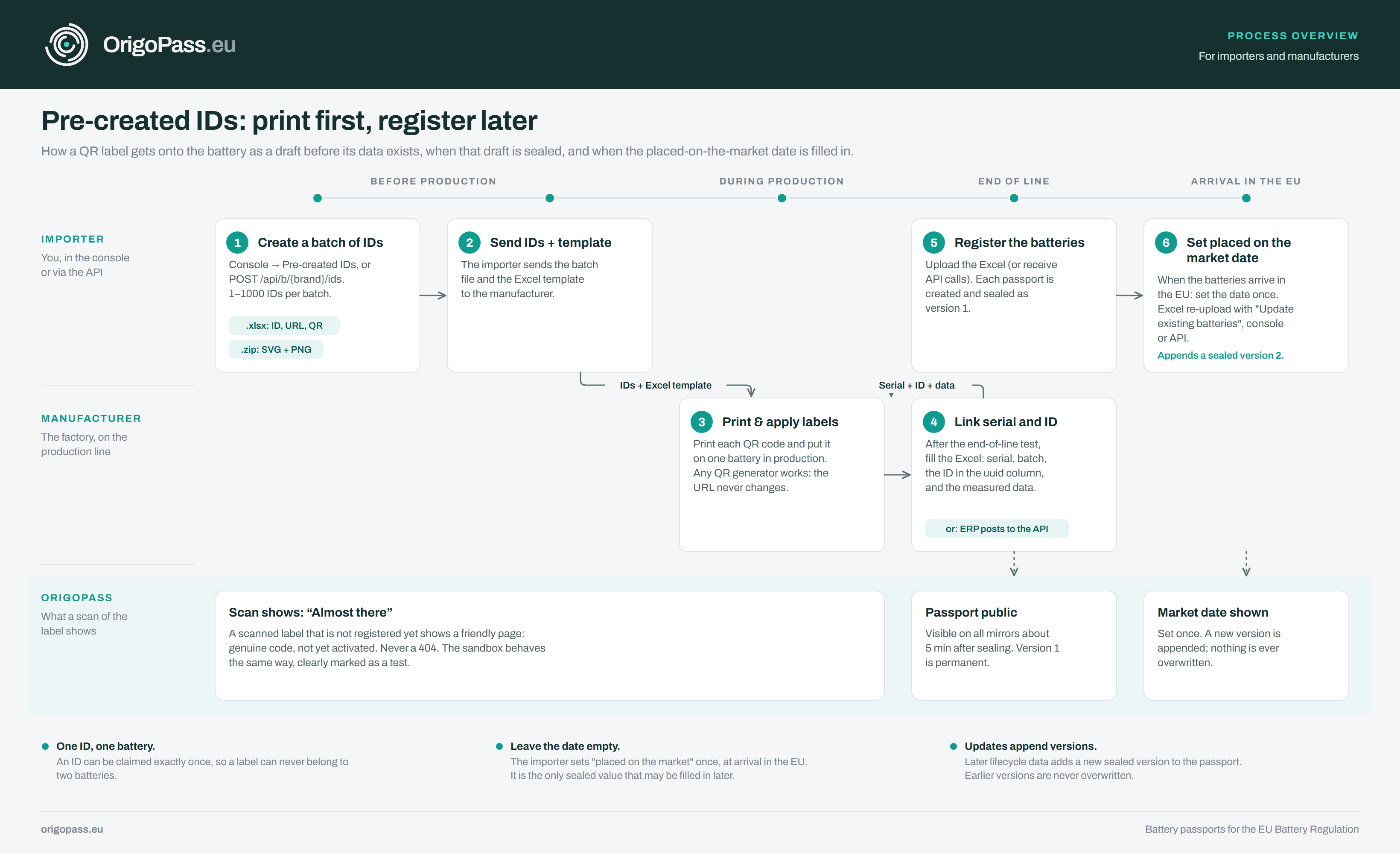
Dates
Always YYYY-MM-DD. Manufacturing date is the day the battery left the line. Placed on the market is the importer's date; leave it empty, the importer sets it later. Put into service is the end customer's first use; leave it empty too, it is updated later.
Lifecycle columns (dynamic.…)
These describe the battery right now. For a battery that has just been made, leave them empty: fades become 0, no cycles, no incidents, remaining capacity and power equal the rated values, status becomes in_service. Two columns need the value measured at the end of the line: state of charge (%) and temperature (°C).
Power capability is in watts. Not Wh, not Ah. Battery voltage at that state of charge × maximum continuous discharge current (the BMS limit). A 12.8 V 100 Ah battery with a 100 A limit delivers roughly 1320 W at 80 % SoC and 1280 W at 20 % SoC. If your test report has measured values, use those. For a new battery, leave the per-unit columns empty; the product values apply.
What happens at import
Every row is validated. A rejected row is reported with its reason and nothing from it is stored; the other rows are registered. A registered passport is sealed: its record cannot be changed afterwards, only lifecycle values can be added in later versions. Check the file before you send it.
You can send the same file again later, for example after the final tests: the company that registers the batteries uploads it with Update existing batteries ticked, and every serial that is already registered gets a new version with the lifecycle cells you filled in. Empty cells keep their current value. The sealed data in the row (serial, batch, manufacturing date) must still match the record.
Questions that are not answered here: ask the company that sent you the file, or write to info@origopass.eu. Questions we get more than once are added to this page.
Frequently asked
Our serial number differs per battery but the batch number is the same. Where do they go?
The serial number goes in the "serial" column and must be different on every row. The batch or lot number goes in the "batch" column and may be the same for many rows. Both are shown on the passport.
What do we fill in for "placed on the market"?
Nothing. It is the day the battery is first made available on the EU market, which is the importer's step, not the factory's. Leave it empty; the importer sets it later, once, when the batteries arrive. It is the one sealed value that may be filled in afterwards, while it is still empty.
Do we need a photo of every battery?
No. The unit photo is optional and for internal use only; it is not even a column in the Excel.
What is the difference between "battery status" and "put into service"?
Status is the life stage: in_service means first life, including a new battery in stock; repurposed means second life; collected means collected as waste; recycled means recycled. A new battery is in_service, which is also what an empty cell becomes. "Put into service" is the date the end customer first uses the battery; you do not know that in the factory, so leave it empty.
Can we leave deep-discharge events, overcharge events and time in extreme temperatures empty?
Yes. For a new battery every lifecycle counter becomes 0 when left empty, fades become 0, and remaining capacity and power are copied from the product sheet. Only state of charge and temperature need the value measured at the end of the line.
What goes into "remaining power capability at 80 % and 20 % SoC (W)"? Our battery is 12.8 V 100 Ah.
Power in watts, not energy in watt-hours, so the Ah figure does not go in. It is the maximum continuous power the battery can deliver at that state of charge: the battery voltage at that SoC multiplied by the maximum continuous discharge current, normally the BMS limit. For 12.8 V 100 Ah with a 100 A BMS limit: about 13.2 V × 100 A ≈ 1320 W at 80 % and about 12.8 V × 100 A ≈ 1280 W at 20 %. These are properties of the model that the account holder enters once on the product; for a new battery leave the per-unit columns empty and the product values are used.
What is "time in extreme temperatures"?
The hours the battery has spent outside its operating temperature range, as logged by the BMS. A new battery has 0; leave it empty.
Can the QR codes be printed first and the Excel filled after final testing?
Both orders work. Either you fill the Excel after end-of-line testing and the importer registers the batteries, which creates the passports and QR codes; or the importer pre-creates IDs, you print the QR labels during production and send the Excel with the "uuid" column filled afterwards. Everything measured later in the battery's life can be updated through the console or the API without a new Excel.